Option A vs option B
When the question is no longer “yes or no” but “which one”, put both options face to face. The same criteria on each side, and the difference jumps out.
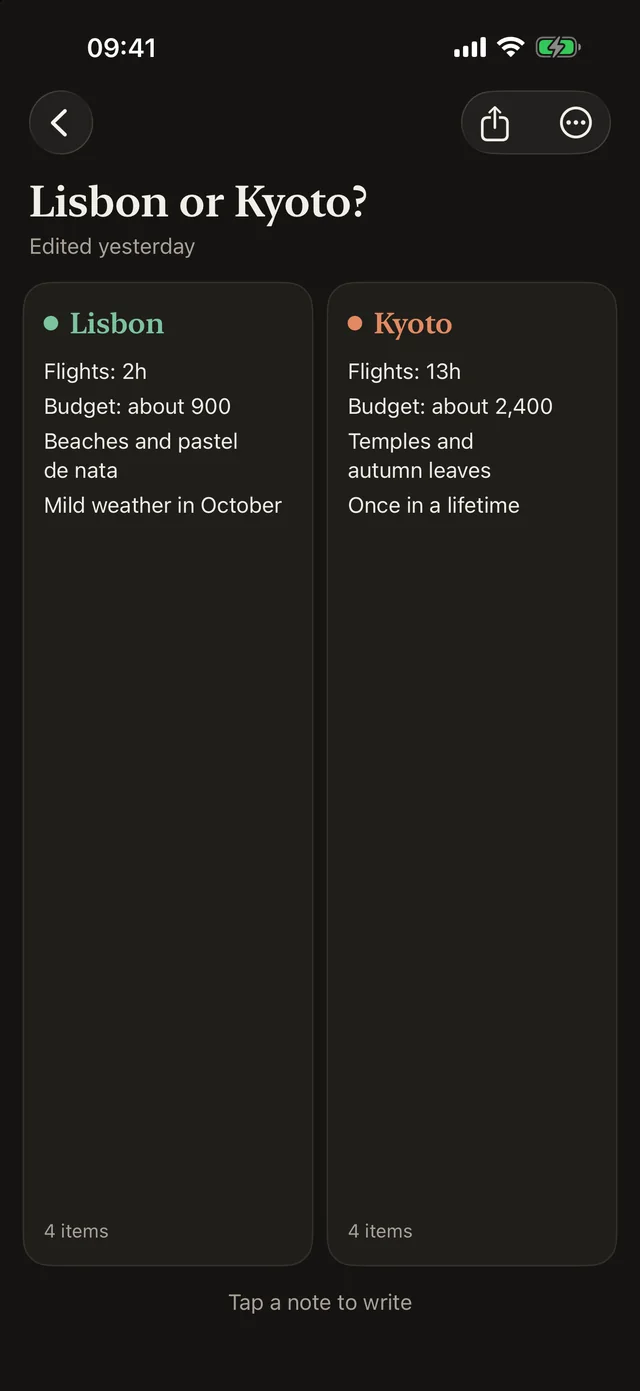
A filled-in example
Lisbon
- Flight: 2h 30
- Budget: about €900
- Beaches and pastéis de nata
- Mild in October
4 items
Kyoto
- Flight: 13h
- Budget: about €2,400
- Temples and red maples
- Trip of a lifetime
4 items
When to use it
To choose between two concrete options: two apartments, two offers, two destinations, two quotes. The template makes you look at each option through the same criteria, so you are not comparing apples and oranges.
- Two apartments or two houses
- Two job offers
- Two holiday destinations
- Two laptops, two phones, two quotes
How to fill it in
- Rename the two notes after each option.
- Pick three to five criteria that matter to you: price, time, comfort, appeal.
- Fill in the criteria in the same order on both sides, so you can read line by line.
- End with a “how I feel about it” line. It often settles two close options.
This template is waiting in Side Notes.
Create a board and pick “Option A vs Option B”: the note headings are already in place. Free on iPhone, iPad and Mac.
Free, no ads, no account.
Printable version
A blank grid, ready to fill in with a pen. The button prints the example and the blank grid, without the rest of the page.
Option A vs option B · Blank grid
Option A
Option B
Frequently asked questions
How is this different from a pros and cons list?
A pros and cons list judges a single option. The A vs B template compares two, with the same criteria on both sides.
What if there are more than two options?
In Side Notes, a four-note board holds up to four options. Beyond that, drop the weakest ones first, two at a time.